
Migrating from Discord
Run your existing Discord bot on GameVox by changing two configuration values: the REST base URL and the gateway URL. No code changes, no SDK swap.
1. Create a GameVox bot application
- Sign in at developers.gamevox.com
- Click New application
- Copy the bot token from the creation modal (shown once, save it now)
2. Point your library at GameVox
discord.js (Node, v14+)
const { Client, GatewayIntentBits } = require('discord.js');

const client = new Client({
  intents: [
    GatewayIntentBits.Guilds,
    GatewayIntentBits.GuildMessages,
    GatewayIntentBits.MessageContent,
  ],
  rest: { api: 'https://bot-api.gamevox.com/api' },
  ws:   { gatewayURL: 'wss://gateway.gamevox.com' },
});

client.login(process.env.GAMEVOX_BOT_TOKEN);
discord.py
import discord

discord.http.Route.BASE = 'https://bot-api.gamevox.com/api/v10'
discord.gateway.DiscordWebSocket.DEFAULT_GATEWAY = (
    'wss://gateway.gamevox.com/?v=10&encoding=json'
)

intents = discord.Intents.default()
intents.message_content = True

client = discord.Client(intents=intents)
client.run(GAMEVOX_BOT_TOKEN)
JDA (Java)
JDA jda = JDABuilder.createDefault(GAMEVOX_BOT_TOKEN)
    .setGatewayEncoding(GatewayEncoding.JSON)
    .setRestConfig(new RestConfig().setBaseUrl("https://bot-api.gamevox.com/api"))
    .setGatewayPool(scheduler)
    .build();
// JDA reads the gateway URL from /gateway/bot at startup,
// which our REST shim returns as wss://gateway.gamevox.com.
Eris (Node)
const Eris = require('eris');

const client = new Eris(GAMEVOX_BOT_TOKEN, {
  rest: { baseURL: 'https://bot-api.gamevox.com/api/v10' },
  ws: { gateway: 'wss://gateway.gamevox.com' },
  // Eris defaults to ETF encoding; force JSON (GameVox doesn't speak ETF yet).
});

client.connect();
DSharpPlus (.NET)
var discord = new DiscordClient(new DiscordConfiguration
{
    Token = Environment.GetEnvironmentVariable("GAMEVOX_BOT_TOKEN"),
    TokenType = TokenType.Bot,
    Intents = DiscordIntents.AllUnprivileged | DiscordIntents.MessageContents,
    ApiChannelEndpoint = "https://bot-api.gamevox.com/api/v10",
    GatewayUri = new Uri("wss://gateway.gamevox.com"),
});

await discord.ConnectAsync();
serenity (Rust)
let mut client = Client::builder(&token, intents)
    .event_handler(Handler)
    .api_base("https://bot-api.gamevox.com/api/v10")
    .gateway_url("wss://gateway.gamevox.com")
    .await?;
client.start().await?;
3. Install the bot on a server
From your application's OAuth2 tab in the developer portal, build an install URL with the permissions you need and share it. The URL takes the standard Discord shape:
https://gamevox.com/oauth2/authorize?client_id=YOUR_APP_ID&scope=bot+applications.commands&permissions=8Server owners click the link, pick a GameVox server they own, and confirm.
4. What's different
The compatibility surface aims for 100%. Your bot's logic doesn't need to know it's not Discord. A few things to be aware of:
- Apps are configured inside the client. GameVox can render your app's settings form in Server Settings, so a configurable bot no longer needs a hosted dashboard. This is the one deliberate incompatibility, and the only part of the platform with no Discord equivalent. Full docs →
- Snowflake epoch: identical to Discord's (
1420070400000, 2015-01-01 UTC). Parsers written for Discord work on GameVox IDs unchanged. More → - Threads / forum posts aren't supported yet.
- Voice works with Lavalink. No special config.
VOICE_SERVER_UPDATEjust points atcompatible-voice-gateway-{region}.gamevox.comand Lavalink handles the rest. - Custom emojis: server-owned emojis work in messages exactly as on Discord. App-owned emojis are managed in the developer portal for now; the bot-API only exposes
GET. See Emojis. - Self-hosted servers: customers can run GameVox on their own hardware. Your bot works there too, with a smaller surface (no webhooks, no interactions yet). See Self-hosted docs.
- EU / AP write latency: Bots hosted outside us-east will see ~80–150ms added latency on writes due to Aurora write forwarding. Host in us-east for best performance.
5. Configure your app from inside GameVox
On Discord, a bot with any configuration ships a web dashboard: a domain, an OAuth2 login, sessions, permission checks, hosting — usually so an operator can pick a log channel and toggle three features. GameVox already knows who the operator is, which server they are configuring, and whether they are allowed to, so it offers that surface to your app directly.
Your app describes a form over the gateway; GameVox renders it in Server Settings ▸ Integrations ▸ Settings and hands the edited values straight back. GameVox stores none of it — your app stays the only owner of its configuration.
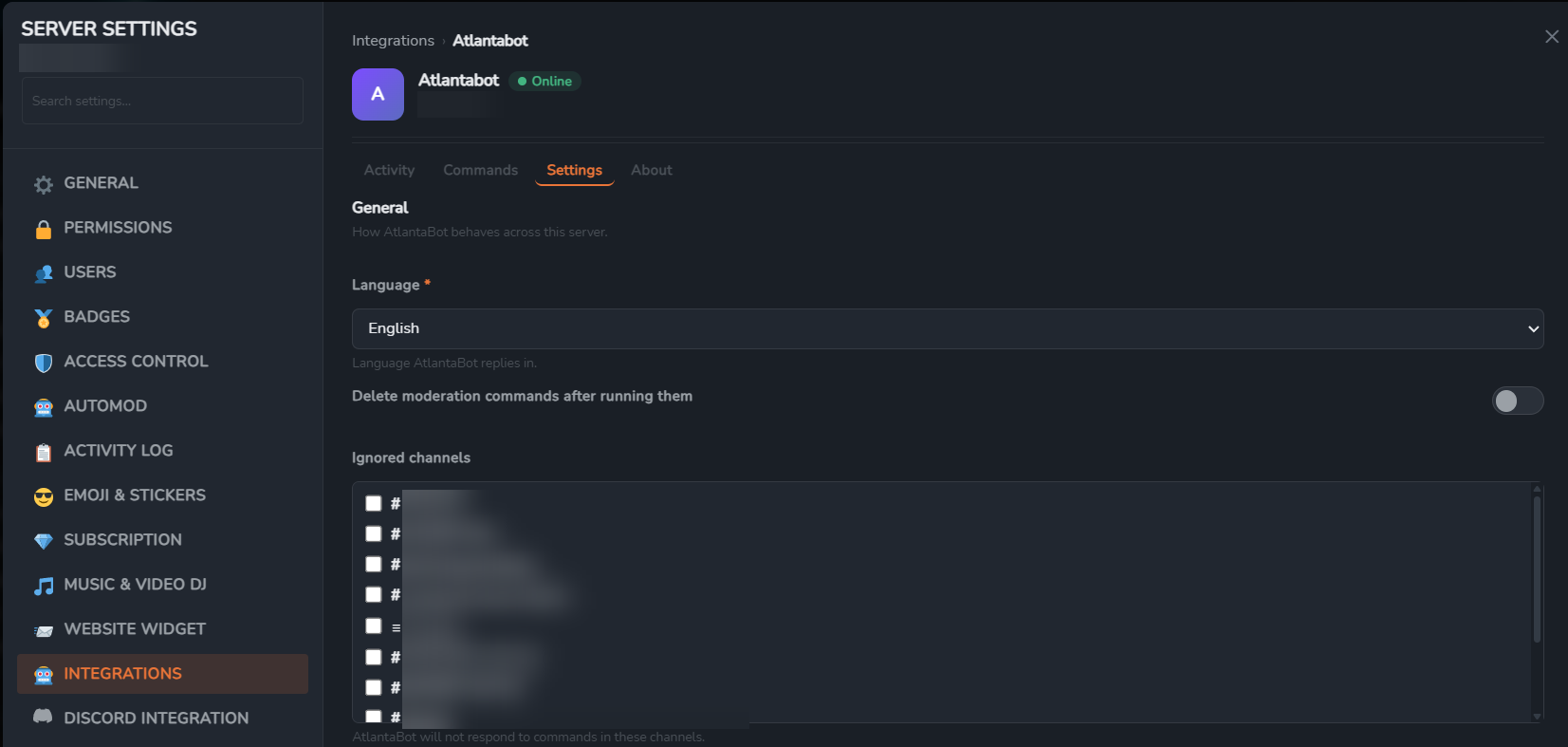
The whole integration is one gateway handler and one REST call:
client.on("raw", async (packet) => {
  if (packet.t !== "APP_SETTINGS_REQUEST") return;
  const { nonce, server_id, action, values } = packet.d;

  const body = action === "save"
    ? { message: await save(server_id, values) }
    : { version: 2, sections: await describe(server_id) };

  await client.rest.post("/applications/@me/settings-response", {
    body: { nonce, ...body },
    query: new URLSearchParams({ server_id }),
  });
});
Twelve field types, including channel and role pickers GameVox populates for you, conditional fields, masked secrets and sections. In-App Settings →
6. Test it
The simplest smoke test: respond to !ping with pong.
client.on(Events.MessageCreate, async (msg) => {
  if (msg.author.bot) return;
  if (msg.content === '!ping') {
    await msg.reply('pong');
  }
});
If READY logs and the reply arrives, your bot is fully connected. Slash commands, voice, components: none require changes either.