
In-App Settings
GameVox can render your app's configuration form inside the client. Your app describes the form over the gateway, an operator edits it in Server Settings ▸ Integrations ▸ Settings, and the edited values come straight back to your bot. GameVox stores none of it — your app remains the only owner of its configuration.
This has no Discord equivalent. It is the one part of the GameVox app platform that is deliberately not compatible, because there is nothing on the other side to be compatible with.
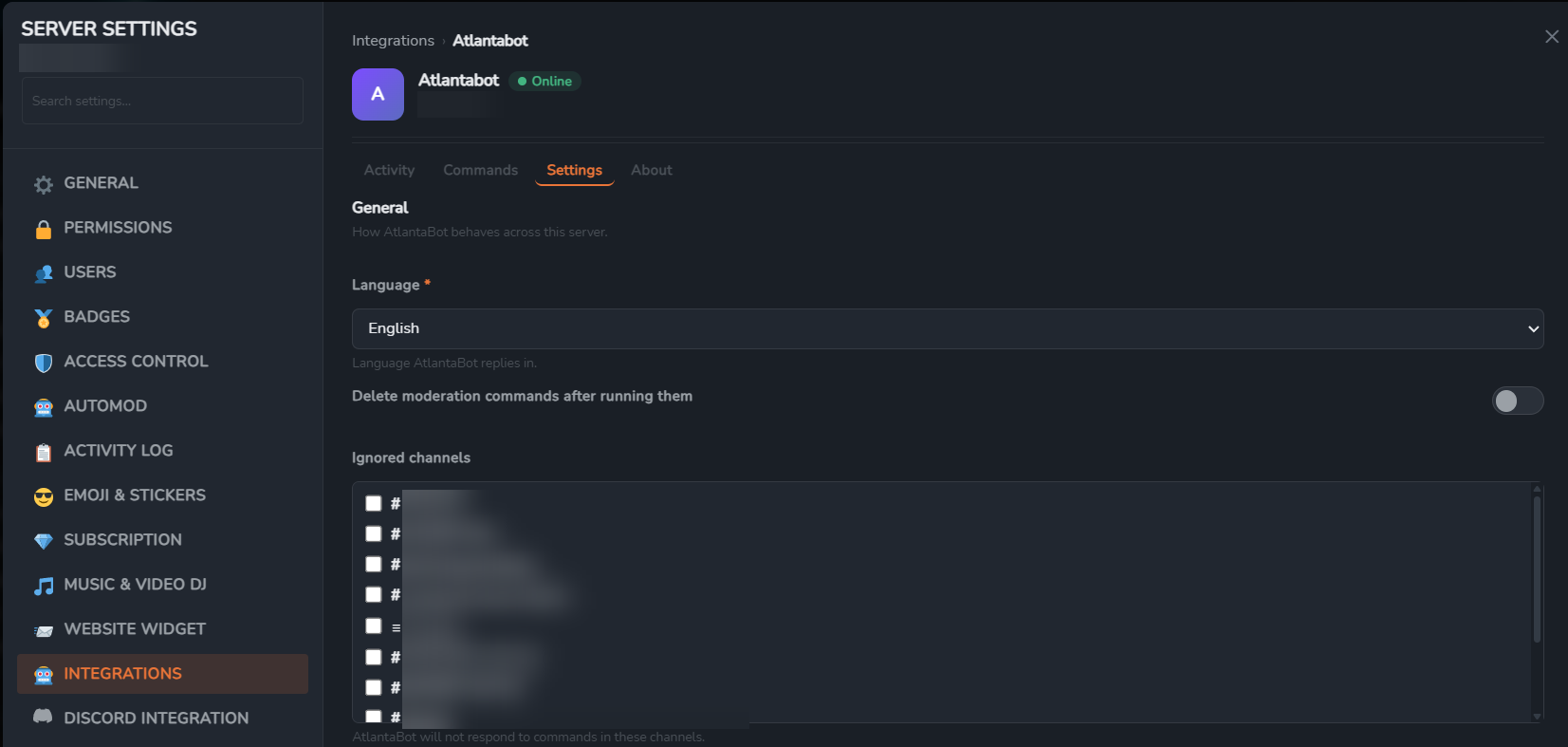
select, a boolean and a channels picker, grouped into a section with a description. The bot sent no channel ids — GameVox supplied that list. Server and channel names redacted.Why this exists
On Discord, a bot with any configuration at all ships a web dashboard: a domain, an OAuth2 login, session handling, a permission check that re-reads the user's guild list, CSRF protection, and hosting for all of it — usually so an operator can pick a log channel and toggle three features. GameVox already knows who the operator is, which server they are configuring, and whether they are allowed to configure it, so it offers that surface to your app directly.
| Discord | GameVox | |
|---|---|---|
| Where operators configure your app | A web dashboard you host | Server Settings ▸ Integrations ▸ Settings |
| What you build | Web app, OAuth2 login, sessions, permission checks, hosting | One gateway handler and one REST call |
| Who authenticates the operator | You, via OAuth2 | GameVox, before your app is ever asked |
| Who stores the configuration | You | You. GameVox retains nothing. |
| Channel and role pickers | You fetch the guild's channels and roles and render them | You name a type; GameVox supplies the choices |
| Cost of exposing one toggle | A dashboard | About twenty lines |
This replaces nothing. Slash commands still work, and if you already have a dashboard you can keep it — the two are not exclusive, and plenty of apps will want the panel for the five settings operators actually change and the dashboard for everything else.
How it works
Operator opens the Settings tab
      │
      ▼
GameVox ──── APP_SETTINGS_REQUEST (action: "describe") ────▶ your bot
                                                                │
your bot ─── POST /applications/@me/settings-response ──────────┘
             { nonce, version: 2, sections: [ ... ] }
      │
      ▼
GameVox renders the form, operator edits it, clicks Save
      │
      ▼
GameVox ──── APP_SETTINGS_REQUEST (action: "save", values) ─▶ your bot
                                                                │
your bot ─── POST /applications/@me/settings-response ──────────┘
             { nonce, message: "Saved." }
Two actions, one request shape, one reply endpoint. describe asks what your app exposes for this server; save hands back what the operator changed. Both are answered the same way.
1. Receiving the request
GameVox dispatches APP_SETTINGS_REQUEST over the gateway to whichever session is holding your app's connection. No intent gates it — the dispatch is addressed to your app specifically, not filtered against an intent mask, so it arrives whatever you identified with.
{
  "op": 0,
  "t": "APP_SETTINGS_REQUEST",
  "d": {
    "nonce": "5f3c1b0e-8a4d-4b2f-9c11-2f7a6d0b4e93",
    "server_id": "1387452901234567890",
    "action": "describe",
    "schema_version": 2
  }
}| Field | Type | Notes |
|---|---|---|
nonce | string | Opaque. Echo it back verbatim; it is the only thing tying your reply to the waiting operator. Answerable for 15 seconds. |
server_id | snowflake | The guild, in the same id space every other dispatch uses. This is the id your GUILD_CREATE carried, so your existing guild cache resolves it. |
action | string | "describe" or "save". |
schema_version | integer | The richest schema this server can render. Currently 2. See Serving an older server. |
values | object | Present on save only. Keys are the field keys you sent. |
server_id is stamped by GameVox from the operator's own authenticated request. It is never read back off your reply, so an app cannot answer a question about one server with settings for another.
Reading the dispatch in your library
No bot library ships a handler for an event Discord does not have, so the packet is dropped before it reaches an event handler. Every library exposes the raw dispatch stream for exactly this case:
| Library | Hook | Enable |
|---|---|---|
| discord.js (v14) | client.on('raw', packet) | On by default. Emitted for every dispatch before the packet is handled. |
| discord.py (v2) | on_socket_raw_receive(msg) | Pass enable_debug_events=True to the client. |
| Eris | client.on('rawWS', packet) | On by default. |
| JDA | RawGatewayEvent | JDABuilder.setRawEventsEnabled(true) |
| DSharpPlus | DiscordClient.UnknownEvent | On by default. EventName plus raw Json. |
| serenity | RawEventHandler::raw_event | ClientBuilder::raw_event_handler |
Against real Discord this handler never fires, so the same build runs on both platforms without a branch.
2. Replying
Answer over REST, not the gateway. Every library exposes an HTTP client; most do not let application code write arbitrary opcodes to the socket, which is why the reply is shaped this way.
POST https://bot-api.gamevox.com/api/v10/applications/@me/settings-response
Authorization: Bot YOUR_BOT_TOKEN
Content-Type: application/json
{
"nonce": "5f3c1b0e-8a4d-4b2f-9c11-2f7a6d0b4e93",
"version": 2,
"message": "Optional note shown above the form.",
"sections": [
{
"key": "welcome",
"label": "Welcome messages",
"description": "Posted when someone joins.",
"fields": [
{ "key": "welcome.enabled", "label": "Send a welcome message",
"type": "boolean", "value": true }
]
}
]
}A successful reply returns 204 No Content. You may append ?server_id= with the guild id; it is used only to attribute the call in your app's activity log.
| Key | Type | Notes |
|---|---|---|
nonce | string | Required. From the request. |
version | integer | Schema you are answering in. Send 2 when you send sections. |
sections | array | Schema v2 form. Mutually exclusive with fields. |
fields | array | Schema v1 flat form. Renders as one unlabelled section. |
message | string | On describe, a note above the form. On save, the confirmation toast. Clipped at 200 characters. |
error | string | Shown to the operator instead of a form. Clipped at 300 characters. |
Always reply, including on failure. Dropping the request silently leaves the operator on a spinner until GameVox's 12-second timeout, which reads as “this app is broken” rather than “something went wrong once”.
3. Field types
Twelve types, and the list is closed — an unrecognised type rejects the whole reply rather than rendering as nothing.
| Type | Control | value you send | What you get back on save |
|---|---|---|---|
string | One-line text box | string | string ("" when blank) |
text | Textarea | string | string |
boolean | Toggle switch | boolean | true / false |
number | Numeric input | number | number, or null if cleared |
select | Dropdown of your options | option value | string, or null if unset |
multiselect | Checklist of your options | array of option values | array of strings (may be empty) |
channel | Dropdown of this server's channels | channel snowflake | snowflake string, or null |
channels | Checklist of this server's channels | array of snowflakes | array of snowflake strings |
role | Dropdown of this server's groups | role snowflake | snowflake string, or null |
roles | Checklist of this server's groups | array of snowflakes | array of snowflake strings |
color | Colour swatch | #rrggbb | #rrggbb, always present |
static | Read-only line of text | string | Never submitted — the key is absent from values |
A colour input always holds a value, so an app that stored none gets #000000 back on the first save. If you need “no colour”, pair the swatch with a boolean.
4. Field attributes
| Attribute | Applies to | Effect |
|---|---|---|
key | all | Required. [A-Za-z0-9][A-Za-z0-9._:-]{0,63}. Unique across the whole reply, not per section. |
label | all | Falls back to the key. Clipped at 100 characters. |
help | all | Hint line under the control. Clipped at 200. |
placeholder | text inputs, number | Clipped at 100. |
options | select, multiselect | Required for those two. { value, label, description }, max 25. Dropped on any other type. |
min , max , step | number | Shapes the input. Advisory — re-check the value you receive. |
max_length | string, text | Caps the input, up to the platform ceiling for that type. |
channel_kinds | channel, channels | Narrows the picker. text, voice, forum, news, fileshare, header. Unknown kinds are dropped; an empty result means every kind. |
required | all | Marks the label and replaces the picker's “None” slot with “Select…”. Presentational — enforce it on save. |
disabled | all | Greys the control. Still submitted, with its current value. |
secret | string, text | Masks the input and blanks the current value on the way out. Any other type rejects the reply. |
show_if | all | { key, equals }. Hides the field until another field in the same reply holds that value. |
show_if is an equality test and nothing else — no expressions, no operators. The referenced key must belong to a single-value field in the same reply and must not be the field's own key; a condition that fails any of those is dropped and the field shows unconditionally. equals may be a string, boolean, number or null.
A hidden field is still submitted. It has a value your app sent, and dropping it would read at your app as the operator clearing it.
5. Channel and role pickers
These are the part worth understanding, because they invert the usual arrangement. Your app names a kind; GameVox supplies the choices.
A channel field carries no ids. You send { "type": "channel" } and, if you want, a channel_kinds filter. GameVox attaches this server's own channel list, the client renders a picker from it, and the operator can only ever submit an option GameVox issued.
Every catalog entry is keyed by the same snowflake your app already sees for that channel or group. There is no id translation step to get wrong: the operator picks a label, your app receives an id in its own namespace, and a value naming something outside this server simply matches no option.
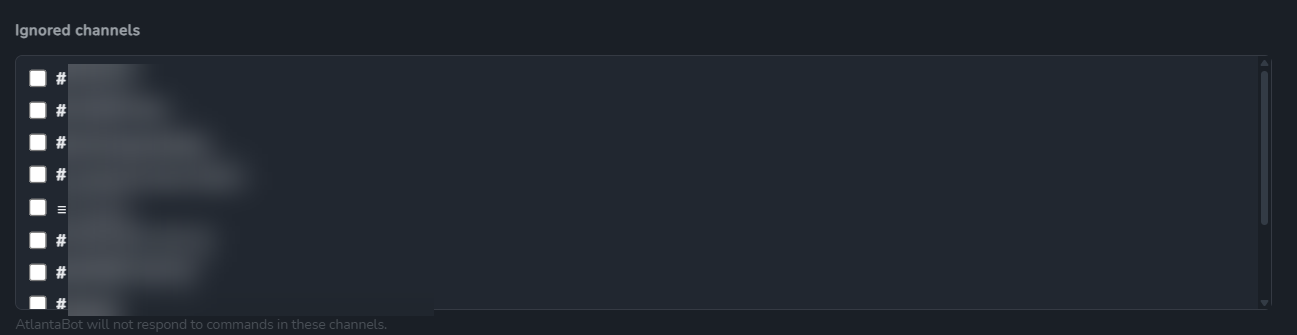
{ "key": "ignored", "type": "channels", "channel_kinds": ["text", "news", "forum", "fileshare"] }. The list, the kind glyphs and the ids are GameVox's.| Situation | What the operator sees |
|---|---|
| Nothing stored yet | A “None” slot, selected. A required field shows “Select…” instead, so a save cannot commit a value nobody chose. |
| Stored id no longer exists (channel deleted) | Kept as “Current selection (no longer listed)”, still selected. Saving does not silently clear it. |
| Stored ids in a multi-picker that are no longer listed | Rendered and ticked alongside the live ones, for the same reason. |
| Catalog unavailable (self-hosted box offline) | Disabled picker reading “Not available right now”. The stored value is echoed back on save, so opening the panel during an outage cannot wipe a setting. |
| Server has more than 500 channels or groups | The list is truncated at 500 rather than shipping a megabyte of options. |
The role catalog excludes two things: the server owner group, which no app should be offered as an assignable role, and the per-app groups that carry installed apps' own permissions.
6. Scenarios
Scenario 1 — The smallest useful panel
One toggle, no sections. A flat fields array is valid at any schema version and renders as a single unlabelled group.
{
  "nonce": nonce,
  "fields": [
    { "key": "greetings", "label": "Greet new members", "type": "boolean", "value": true }
  ]
}
Scenario 2 — Grouping into sections
{
  "nonce": nonce,
  "version": 2,
  "sections": [
    {
      "key": "general",
      "label": "General",
      "description": "How the bot behaves across this server.",
      "fields": [
        { "key": "prefix", "label": "Command prefix", "type": "string",
          "value": "!", "max_length": 4, "help": "Used for legacy text commands." }
      ]
    },
    {
      "key": "logging",
      "label": "Audit logging",
      "fields": [
        { "key": "log.enabled", "label": "Log moderation actions", "type": "boolean", "value": false }
      ]
    }
  ]
}
Section key is optional but must be unique when present. label and description are both optional; a section with no fields is not rendered.
Scenario 3 — Ask for a channel
No ids, no fetching the guild's channel list. Restrict the picker to the kinds that can hold a message.
{
  "key": "log.channel",
  "label": "Log channel",
  "type": "channel",
  "value": stored.logChannelId ?? null,
  "channel_kinds": ["text", "news"],
  "help": "Where moderation actions are recorded."
}
Use "channel_kinds": ["header"] when you want a category rather than somewhere to post — headers are GameVox's categories.
Scenario 4 — Reveal fields conditionally
The usual shape: a boolean that gates the rest of its feature.
"fields": [
  { "key": "welcome.enabled", "label": "Send a welcome message",
    "type": "boolean", "value": true },

  { "key": "welcome.channel", "label": "Channel", "type": "channel",
    "value": stored.welcomeChannel ?? null,
    "channel_kinds": ["text", "news"],
    "show_if": { "key": "welcome.enabled", "equals": true } },

  { "key": "welcome.message", "label": "Message", "type": "text",
    "value": stored.welcomeMessage ?? "",
    "max_length": 1800,
    "placeholder": "Welcome {user} to {server}!",
    "help": "{user}, {server} and {membercount} are substituted when sent.",
    "show_if": { "key": "welcome.enabled", "equals": true } }
]
Conditions can key off a select too, which is how you build a mode switch: "show_if": { "key": "mode", "equals": "advanced" }.
Scenario 5 — Your own choices
select and multiselect are the two types that carry their own options. Both require at least one option and allow at most 25.
{
  "key": "automod.action",
  "label": "When a filter matches",
  "type": "select",
  "value": stored.action,
  "required": true,
  "options": [
    { "value": "delete",  "label": "Delete the message" },
    { "value": "warn",    "label": "Warn the author",  "description": "Deletes and DMs the member." },
    { "value": "timeout", "label": "Time the author out", "description": "10 minutes." },
    { "value": "none",    "label": "Do nothing" }
  ]
}
{
"key": "automod.filters",
"label": "Active filters",
"type": "multiselect",
"value": stored.filters,
"options": [
{ "value": "invites", "label": "Discord/GameVox invites" },
{ "value": "links", "label": "Links" },
{ "value": "mentions", "label": "Mass mentions" },
{ "value": "caps", "label": "Excessive caps" }
]
}An option's description appears after the label in a dropdown and as a tooltip in a checklist.
Scenario 6 — Roles
Same catalog rule as channels. GameVox lists this server's groups by rank, with their colours.
"fields": [
  { "key": "autorole.role", "label": "Role given on join",
    "type": "role", "value": stored.autoRole ?? null },

  { "key": "moderator.roles", "label": "Roles that may use moderation commands",
    "type": "roles", "value": stored.modRoles,
    "help": "Members with any of these can run /ban and /timeout." }
]
Scenario 7 — Numbers with bounds
{
  "key": "automod.threshold",
  "label": "Messages before a raid is declared",
  "type": "number",
  "value": stored.threshold ?? 10,
  "min": 3,
  "max": 100,
  "step": 1,
  "help": "Counted over a rolling 60-second window."
}min, max and step shape the control only. The operator's browser is not a validator you control, so clamp the value again when it comes back — and note that clearing the box submits null, not 0.
Scenario 8 — Secrets
Mark a credential secret and GameVox blanks its current value on the way out. It is not in the WebSocket frame, not in the DOM, and not in a screenshot of the panel — the operator sees an empty masked box placeholdered “Unchanged”.
{
  "key": "integrations.apiKey",
  "label": "Weather API key",
  "type": "string",
  "secret": true,
  "help": "Leave blank to keep the current key."
}
The contract that follows from that: an empty submitted secret means “leave unchanged”, never “clear this”. If an operator needs to remove a credential, give them an explicit boolean to do it. secret on anything other than string or text rejects the reply.
Scenario 9 — Read-only status
static renders a line of text and is never submitted. Use it for state the operator needs while configuring but cannot edit here.
"fields": [
  { "key": "plan", "label": "Plan", "type": "static", "value": "Pro — 4,000 lookups/day" },
  { "key": "usage", "label": "Used today", "type": "static", "value": "1,284 lookups" },
  { "key": "lastSync", "label": "Last sync", "type": "static", "value": "2026-09-02 14:31 UTC" }
]
Scenario 10 — Handling a save
The save request carries values, keyed by the field keys you sent. Persist, then reply with a confirmation.
// action === "save"
const v = req.values ?? {};

const guild = client.guilds.cache.get(req.server_id);
if (!guild) return reply(nonce, { error: "This bot is no longer in that server." });

const patch = {};

// boolean: always a real boolean
patch.welcomeEnabled = v["welcome.enabled"] === true;

// channel: a snowflake string or null — re-check it against THIS guild
const chan = v["welcome.channel"];
patch.welcomeChannel =
  (typeof chan === "string" && guild.channels.cache.has(chan)) ? chan : null;

// number: number or null when the operator cleared the box
const n = v["automod.threshold"];
patch.threshold = typeof n === "number" ? Math.min(100, Math.max(3, Math.round(n))) : 10;

// secret: empty means unchanged
const key = v["integrations.apiKey"];
if (typeof key === "string" && key.trim() !== "") patch.apiKey = key.trim();

await store.update(req.server_id, patch);
await reply(nonce, { message: "Settings saved." });
Your message becomes the operator's confirmation toast. The form is left exactly as they had it, so they can keep editing.
Scenario 11 — Rejecting a save
Return error and the operator sees your text instead of a confirmation. Use it for anything you cannot accept: a value that fails your own validation, a plan limit, an upstream credential that no longer works.
// `required` is presentational — enforce it here.
const action = v["automod.action"];
if (!["delete", "warn", "timeout", "none"].includes(action)) {
  return reply(nonce, guildId, {
    error: "Choose what AutoMod should do when a filter matches.",
  });
}

// Anything only your side can know.
if (patch.apiKey && !(await upstream.verifyKey(patch.apiKey))) {
  return reply(nonce, guildId, {
    error: "That API key was rejected by the weather provider.",
  });
}
The same applies to describe: if your database is down, answer with an error rather than not answering. “This app could not read its settings right now” is a far better outcome for the operator than a twelve-second spinner.
Scenario 12 — Serving an older server
The request carries schema_version, so you never have to probe. Serve the richest form the server will actually render.
const version = typeof req.schema_version === "number" ? req.schema_version : 1;

if (version >= 2) {
  await reply(nonce, { version: 2, sections: describeV2(guildId) });
} else {
  // v1: flat list, four types — string, boolean, number, select
  await reply(nonce, { fields: describeV1(guildId) });
}
The reverse also holds. A v2 reply reaching an older client still renders: GameVox sends a flattened fields array alongside sections, and a client that predates the newer types draws them as text boxes. Degraded, but nothing is hidden.
Scenario 13 — Self-hosted servers
Works unchanged. On a self-hosted server the channel and role catalogs are fetched from the customer's own box rather than from cloud tables, which is invisible to your app — same field types, same snowflakes, same reply.
The one difference you can observe: if the box is unreachable, pickers arrive empty and render as “Not available right now”. Your app's stored values are echoed back on save, so nothing is lost. Do not treat an empty picker as “the operator cleared it”.
7. What GameVox validates, and what it does not
GameVox checks the shape of a save, and explicitly not its meaning. It does not retain the form it rendered — storing none of your configuration is the whole point — so by the time a save arrives, nothing on our side knows which key was a channel picker and which was a free-text box.
| GameVox guarantees | You must still check |
|---|---|
Keys match the key charset and are not __proto__, constructor or prototype | That the key is one you actually sent |
Values are null, boolean, number, string, or an array of strings — never a nested object | That the type matches the field you declared |
| Strings are bounded (2,000 characters) and arrays hold at most 25 entries | Your own tighter limits |
| Every picker id was issued by GameVox from this server's catalog | That the id still resolves in this guild — catalogs are a snapshot, and a channel can be deleted between render and save |
| The operator is the server owner or holds Manage Server, and the app is installed here | Any authorisation of your own (a plan tier, a linked account) |
This is not a gap the panel introduces — an operator can already POST anything at all to an app's own dashboard. It is the contract, and it is exactly why the picker types hand you ids GameVox minted instead of letting an app decide what an id means.
8. Limits
Two behaviours here, and the difference matters: counts and structure reject the whole reply, so you find out; text ceilings clip quietly, so an operator never sees a broken layout.
| Limit | Value | On overflow |
|---|---|---|
| Sections per reply | 12 | Rejected |
| Fields per reply (total, not per section) | 60 | Rejected |
Options per select / multiselect | 1–25 | Rejected |
| Selected entries in a multi-value | 25 | Rejected |
| Field / section key | 64 chars | Rejected |
| Option value | 64 chars | Rejected |
| Reply body | 256 KB | 413 |
| Label, placeholder | 100 chars | Clipped |
| Help text | 200 chars | Clipped |
| Section description | 300 chars | Clipped |
message | 200 chars | Clipped |
error | 300 chars | Clipped |
Value of a string-family field | 1,000 chars | Clipped |
Value of a text / static field | 2,000 chars | Clipped |
| Channels or roles in a catalog | 500 | Truncated |
A rejection is reported to the operator as “This app sent settings GameVox could not read: <reason>”, naming the ceiling you hit and the field that hit it. Duplicate keys, an unknown type, a select with no options, and sending both sections and fields are rejected the same way.
Silently corrected rather than rejected
- A current
valuethat does not fit its type becomes empty. A stale value should blank one field, not take down the panel. optionson a type that does not use them are dropped.min/max/stepon a non-numeric field are dropped.- Unrecognised
channel_kindsentries are dropped. - A
show_ifnaming an unknown key, itself, or a multi-value field is dropped, and the field shows unconditionally.
9. Timing and failure modes
| Behaviour | Value | What happens |
|---|---|---|
| Reply window | 12s | The operator is told “This app did not respond. It may not support in-app settings.” |
| Nonce lifetime | 15s | A late reply is dropped rather than delivered to nobody. Answering with an expired nonce returns 404. |
| Cooldown | 2s per action, per app, per server | “Give the app a moment, then try again.” describe and save have separate windows, so opening the panel does not block an immediate save. |
| App offline | — | Refused up front: “This app is offline, so it cannot be configured right now.” No dispatch is attempted. |
| Wrong app answering | — | 403. A nonce is bound to the application it was issued for. |
| Duplicate reply | — | The first answer wins; the second is a no-op. |
Every request turns into a gateway dispatch at your app, so the cooldown exists to stop an operator using GameVox to hammer a third party's bot. Budget your describe handler accordingly: it runs on a page open, and a database read is expected, but twelve seconds is the wall.
10. Complete example (discord.js)
Drop-in, minus your own storage layer. This is the same shape the reference implementation uses.
const SCHEMA_V2 = 2;
const POSTABLE = ["text", "news", "forum", "fileshare"];

client.on("raw", (packet) => {
  if (!packet || packet.t !== "APP_SETTINGS_REQUEST") return;
  void handleSettings(packet.d ?? {});
});

async function reply(nonce, guildId, body) {
  await client.rest.post("/applications/@me/settings-response", {
    body: { nonce, ...body },
    query: new URLSearchParams({ server_id: guildId }),
  });
}

async function handleSettings(req) {
  const nonce = typeof req.nonce === "string" ? req.nonce : "";
  const guildId = typeof req.server_id === "string" ? req.server_id : "";
  if (!nonce || !guildId) return;

  try {
    if (req.action === "save") {
      const message = await applySettings(guildId, req.values ?? {});
      return await reply(nonce, guildId, { message });
    }

    const version = typeof req.schema_version === "number" ? req.schema_version : 1;
    if (version >= SCHEMA_V2) {
      return await reply(nonce, guildId, {
        version: SCHEMA_V2,
        sections: await describe(guildId),
      });
    }
    return await reply(nonce, guildId, { fields: await describeLegacy(guildId) });
  } catch (err) {
    // Answer even on failure — a silent drop reads as a broken app.
    await reply(nonce, guildId, {
      error: "The bot could not read its settings for this server.",
    }).catch(() => undefined);
  }
}

async function describe(guildId) {
  const cfg = await store.get(guildId);
  return [
    {
      key: "general",
      label: "General",
      description: "How the bot behaves across this server.",
      fields: [
        { key: "prefix", label: "Command prefix", type: "string",
          value: cfg.prefix, max_length: 4 },
        { key: "ignored", label: "Ignored channels", type: "channels",
          value: cfg.ignored, channel_kinds: POSTABLE,
          help: "Commands are not answered in these channels." },
      ],
    },
    {
      key: "welcome",
      label: "Welcome messages",
      description: "Posted when someone joins.",
      fields: [
        { key: "welcome.enabled", label: "Send a welcome message",
          type: "boolean", value: cfg.welcome.enabled === true },
        { key: "welcome.channel", label: "Channel", type: "channel",
          value: cfg.welcome.channel ?? null, channel_kinds: POSTABLE,
          show_if: { key: "welcome.enabled", equals: true } },
        { key: "welcome.message", label: "Message", type: "text",
          value: cfg.welcome.message ?? "", max_length: 1800,
          placeholder: "Welcome {user} to {server}!",
          show_if: { key: "welcome.enabled", equals: true } },
      ],
    },
  ];
}

async function applySettings(guildId, v) {
  const guild = client.guilds.cache.get(guildId);
  if (!guild) throw new Error("not in guild");

  const channel = (id) =>
    typeof id === "string" ? (guild.channels.cache.has(id) ? id : null) : null;

  await store.set(guildId, {
    prefix: String(v.prefix ?? "!").slice(0, 4) || "!",
    ignored: Array.isArray(v.ignored) ? v.ignored.filter(channel).slice(0, 25) : [],
    welcome: {
      enabled: v["welcome.enabled"] === true,
      channel: channel(v["welcome.channel"]),
      message: String(v["welcome.message"] ?? "").slice(0, 1800),
    },
  });

  return "Settings saved.";
}
11. Checklist before you ship
- Every field key is stable. Renaming one orphans whatever the operator already configured.
- Every id from a picker is re-checked against the guild before it is written.
- An empty
secretis treated as unchanged, never as cleared. - The
describepath answers in well under 12 seconds, including its database read. - Every failure path still replies — with
error, not with silence. requiredandmin/maxare enforced again on save.- An empty picker means the catalog was unavailable, not that the operator cleared the field.
- The handler is a no-op on Discord, so one build runs on both.
Who can open the panel
The server owner, or a member with Manage Server — the same gate that governs installing and uninstalling apps. On a self-hosted server the check is made against the customer's own box, so an admin there is not denied for lacking a cloud permission row.
GameVox refuses the request outright if your app is not installed on that server, so a panel request can only ever reach an app the operator has already authorised.